Nothing modeled by hand
The 3D model is generated automatically from your 2D design. Change a parameter and it regenerates itself. What used to take hours of CAD work now comes out in seconds.
idea3d studio converts your 2D profiles into production-ready 3D models. Import your DXF, choose the part type, set the measurements and generate. From your Illustrator or CorelDRAW file to the part coming off the printer — without modeling anything by hand.
Free for the first 14 days · No card · Windows 10 & 11
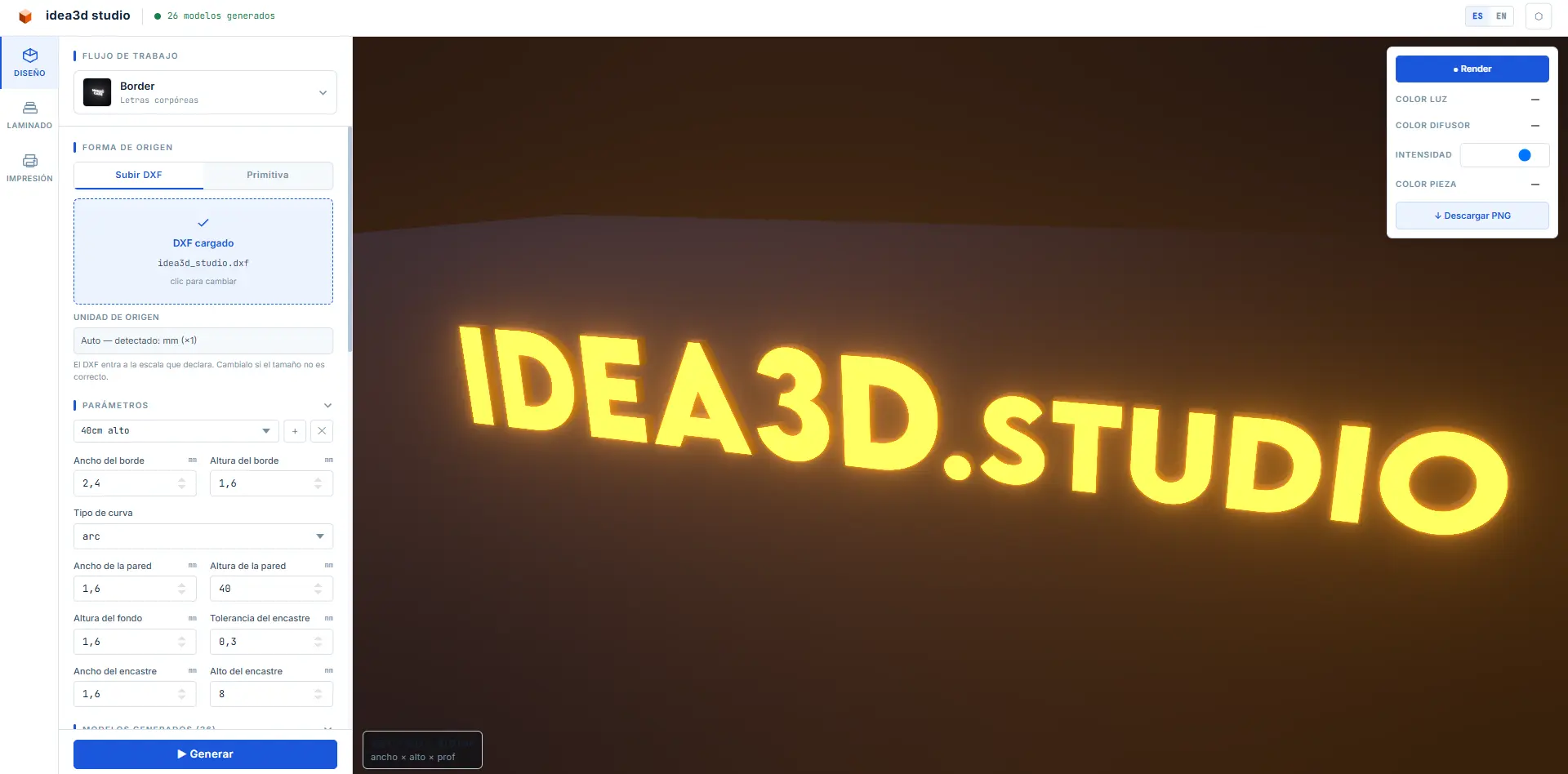
Captura de la app — agregar public/screenshot-app.png
Every 3D signage piece starts as a 2D file. The problem is what comes next: turning that design into a 3D model is slow, requires different software and different skills. That gap between the vector and the printed part is pure friction — and it repeats on every project.
You bring the design you already have. idea3d studio handles everything that comes next.
Drag in your DXF exported from Illustrator, CorelDRAW, AutoCAD or any other program. The profile appears instantly in 3D view. You can also generate basic shapes from scratch inside the app.
Select the flow you need — dimensional letter, LED channel, neon diffuser, interlock and more. Adjust depth, tolerances and production parameters. The 3D model regenerates on its own as you change the values.
The software exports production-ready models. You can slice them directly with the built-in slicer using pre-configured profiles — and if your printer is on the network, you send the job to print from the same app, without leaving the software.
It's not a CAD tool or a slicer. It's automation of the complete workflow: from 2D profile to printed part, built for people who work with real design and real production.
The 3D model is generated automatically from your 2D design. Change a parameter and it regenerates itself. What used to take hours of CAD work now comes out in seconds.
No need to learn Fusion, Blender or anything like it. If you have a DXF, you have a 3D model. idea3d studio closes the gap between the graphic designer and the printer.
From DXF to gcode without opening another program. The built-in slicer with pre-configured profiles and direct sending to the network printer close the complete workflow inside the app.
Your designs never leave your PC. The software works without depending on the internet, so you keep working even if the connection drops.
These are the flows that come ready to use. Import your 2D profile, select the format and the model generates itself.
Generate the face, sides and base of each letter from the client's logo. Ready to assemble and mount.
Parts with the exact channel to hold the light strip, spaced just right for an even glow.
Letters that cast light onto the wall for that floating halo effect so often requested in shops and offices.
Turn a stroke or a signature into an LED-neon sign, with its diffuser channel, ready to print and wire.
Frames and diffusers for back-lit signs, built to the exact size of the face you designed.
Parts that assemble into each other with just the right tolerance — no glue, no endless test prints.
Your case isn't on the list? New flows are added often — write to us and let's see.
Download the program and use it fully for 14 days, no card required. Only when you decide to continue do you activate your license.
/ month · billed annually · up to 1 computers
/ month · billed monthly
Windows 10 y 11 · 64 bits · 160 MB
Are you a workshop with several seats? Write to us at ventas@idea3d.studio and we'll build a plan that fits.
No. You keep designing in 2D as always, in the program you already use. idea3d studio takes that profile and builds the 3D model for you. You don't have to learn any modeling software.
The main format is DXF, exported by almost every vector design program: Illustrator, CorelDRAW, AutoCAD, Inkscape and more. You can also generate basic shapes from scratch inside the app.
Just Windows 10 or 11. The installer bundles everything else: there's nothing technical to install separately. It's about 160 MB and the program opens in under a second.
It works with the most common 3D printers on the market. If your printer is on the network, you can send the job to print straight from the app. If not, you export the file and load it via USB or card as you do today.
No. All the work happens inside your computer and your designs never leave it. The internet is only used to validate your license. If the connection drops, you can keep working for several days without a problem.
You can keep opening the program, viewing your projects and adjusting measurements. The only thing that pauses is generating new files and sending to print, until you activate your license. You lose none of your work.
You write to soporte@idea3d.studio and we reply within 48 hours on weekdays, much sooner if it's urgent. A real person helps you — no endless forms, no automated replies.
Still have a question? Write to us at ventas@idea3d.studio.
Download idea3d studio and automate the complete workflow — from design to printer — this very afternoon. No card, no commitment.
Windows 10 y 11 · 160 MB · Free for the first 14 days